Deadband Compression Thinning Model
The deadband compression model thins data based on a deviation value. This model is based upon the age of the entry, so larger deviations can be set to correspond to older data. As with CVS deadbanding, an entry is only saved if the difference between its value and the last value is equal to or greater than the specified deviation. Within each period, the oldest value is always saved and used as the baseline value. Once an entry whose value equals or exceeds the most recently saved value is found, both it and the previous entry are saved. The previous entry is saved so as to preserve square wave forms when trending.
See History Deadband Compression for more information about this method of compression.
Deadband Compression Thinning Model Properties
| Property | Description |
|---|---|
|
Save records with status bit changes |
If enabled, a new entry is saved if the status bits have changed even if the value doesn’t exceed the deviation. |
|
Delete unreliable records |
If enabled, deletes all records that are marked as unreliable. Note: Only Analog point types marked as unreliable will be deleted. Use the Unreliable thinning model to delete all point types marked as unreliable. |
| Period Definition | |
|
Starting at day |
Specifies the number of days between today and timestamp of an entry. Must be a value greater than 0; no thinning can occur on entries from the current day. ExampleA day value of 60 would correspond to all entries at least 60 days older than today. |
|
Deviation |
Determines how much a value must exceed the last value for the point by before it will be saved. Must be a value greater than 0 for thinning to occur. The Thinning Simulator can be used to help determine an appropriate deviation value. ExampleIf the deviation is set to 5, in order for a value to be retained in the VHS it must have a value that is 5 units greater or 5 units less than the last value saved for the point. |
|
Preview |
Click to preview Deadband Compression for the selected point in the Compression Preview feature. See Previewing Data Compression in the History chapter for more information. Note: Compression Type and Deviation are the only parameters passed to the Compression Preview dialog box. Deviation is the only setting passed back to the Deadband Compression page. |
|
Set Max Time |
If enabled, and the time elapsed between an entry and the last saved entry is greater than the specified max time, then the entry will be automatically saved even if it does not exceed the deviation. |
|
(seconds) |
Type the Max Time in seconds. |
To Create a Deadband Compression Thinning Model
- On the Configure Thinning Models dialog box, click Create Model.
- Type a Model Name. This name should fully identify the model to ease selection of the appropriate model when creating rules.
- Select the Deadband Compression page.
- If desired, enable Save records with status bit changes.
- If desired, enable Delete unreliable records.
- For each period range, type the Starting at day, Deviation, enable Set Max Time, and (seconds).
- Click Preview to preview the compression settings. See Previewing Data Compression.
- Click Add/Save to add the range to the list box.
- To make changes to an existing range, select the range from the list and click Edit.
- To delete a range highlight and click Delete.
- To delete all ranges click Clear All.
- Repeat steps 6 and 7 for each desired range.
- Click Save Model. To discard all changes click Cancel.
- To make changes to an existing model, select the model from the list and click Edit Model.
- To delete an entire model highlight the model name and click Delete Model. Models may only be deleted if no rules are currently set to use the model.
- Click OK to return to the Configure Thinning Rules dialog box.
To Edit an Existing Deadband Compression Thinning Model
- On the Configure Thinning Rules dialog box, select an existing thinning rule, and click Edit Rule.
- On the Configure Thinning Rules dialog box, select an existing thinning rule, and click View/Edit Models.
- Select an existing Deadband Compression thinning model, and click Edit Model.
- Edit the model as described in steps 4 -10 above.
Deadband Compression Thinning Model Example
|
Sample Deadband Compression Thinning Model |
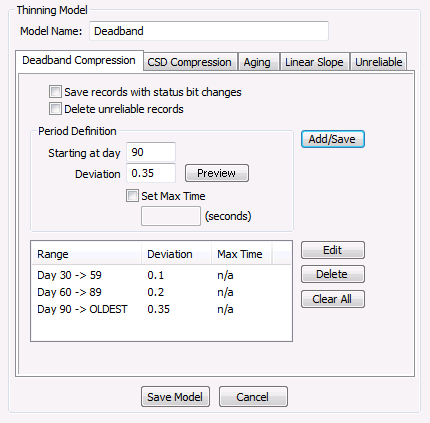
In the example above, history values newer than 30 days would not be subject to thinning. Between days 30 and 59 a deviation of 0.1 would be applied. History values 60 to 89 days old would be thinned with a deviation of 0.2 and all values older than 90 days would be thinned with a deviation of 0.35. Threshold values should increase with larger day values because data should be thinned more stringently as it gets older. If thresholds decreased for older values the values would have already been thinned by stricter criteria before the data aged enough to be thinned by the lower older data threshold. When a threshold is set for a specific day, that threshold remains in effect until either a higher threshold is specified, or the end of the entries is reached.


